ECU & log compatibility
Built around your data. Across EFI brands.
Your log channels, your table axes and your fuel strategy define the workspace. FTT is a configurable analysis tool for professional and hobbyist tuners across racing and powersports.
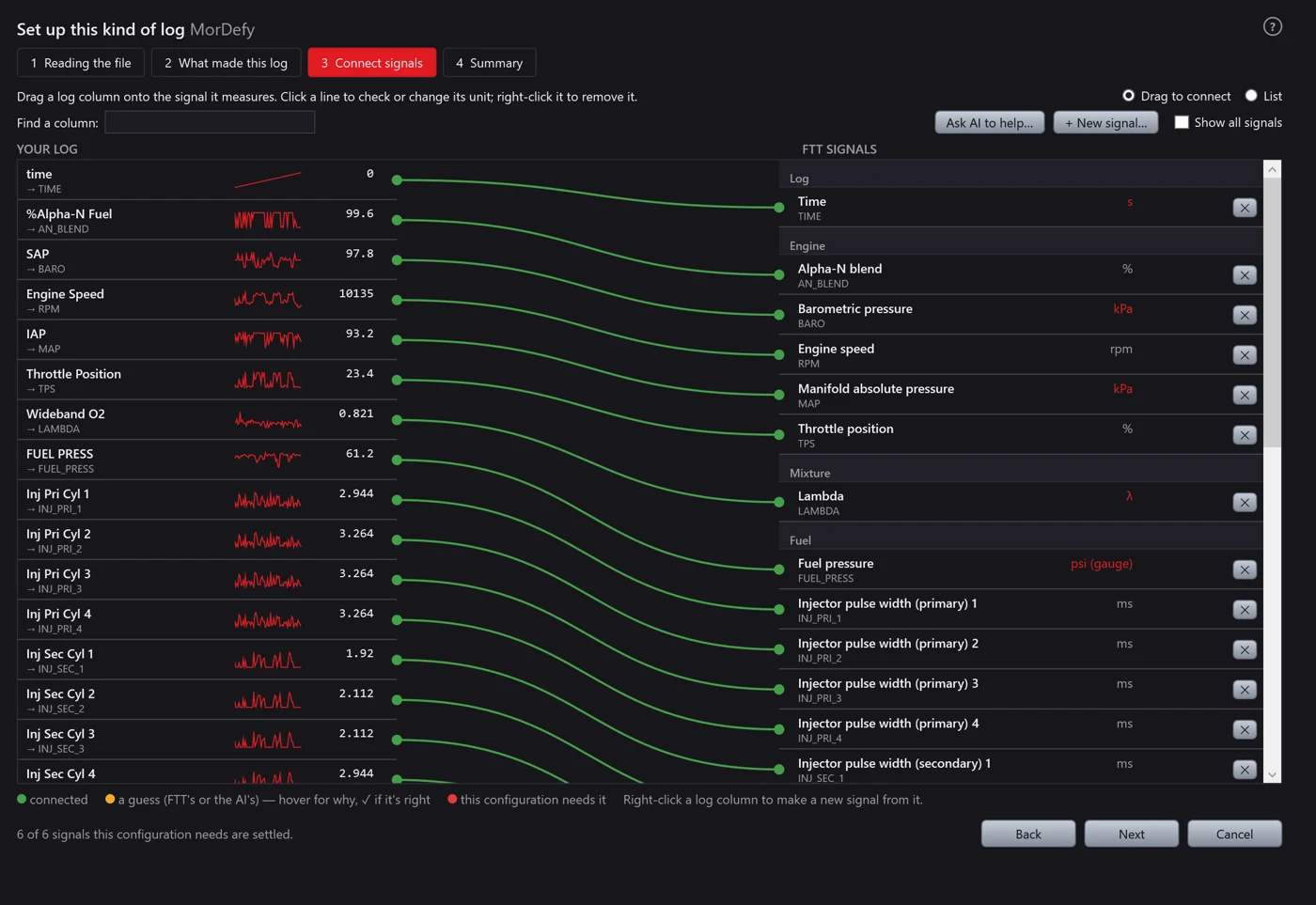
THE INPUT
Start with a suitable CSV log.
FTT reads exported log data. Log Setup connects the columns to signals such as RPM, TPS, MAP and lambda, and handles configured unit conversions. Review detected or suggested mappings and connect anything missing.
The channels you need depend on your analysis. Fuel-map work needs suitable axes and mixture data; other calculations may need additional signals. A familiar brand name alone does not establish compatibility.
YOUR FUEL STRATEGY
Choose a starting point.
Make it your own.
Start from a template, then configure the maps, grids, formulas and filters for your engine.
Alpha-N
Build a map around RPM and throttle position.
Speed density
Work with RPM and manifold pressure.
Volumetric efficiency
Analyze a VE-based fuel strategy.
Mass air
Work with a MAF-based fuel strategy.
Alpha-N/Speed Density Hybrid Systems
Combine throttle-position (Alpha-N) and manifold-pressure (speed density) fuel strategies. Configure separate grids and the rules that determine which log samples feed each map. This refers to EFI fuel strategies, rather than gas/electric hybrid vehicles.
WHAT TO CHECK
Bring the right information.
- A usable CSV export with channel headers and numeric log data.
- The signals required by your chosen workspace and analysis.
- The correct channel mappings, time scale and units.
- Your ECU table axes, starting map and targets when working on fuel maps.
Availability of a particular channel, export format or ECU strategy should be checked with your actual files. FTT is not a universal reader for every proprietary ECU file.
YOU STAY IN CONTROL
Analyze here.
Apply in your ECU software.
FTT reads your logs without changing the original files. Review its calculations and map changes, then copy the selected table values into your own tuning software. FTT does not connect to or flash your ECU.
Save the workspace configuration to reuse its maps, axes, mappings and settings in the next session.
What happens if you stop paying ↗INTERNET REMOTE TUNING
Work with your chosen tuner.
Both Hobby and Pro include Allow, so you can invite a professional tuner using Fullsend Tuner Toolkit Pro to connect and help you. Pro includes Connect for tuners providing that help.
A CONNECTION, WITH CLEAR EXPECTATIONS
Your tuner. Your arrangement.
Remote Tuning gives you a way to work with a professional tuner of your choice. It does not include tuning assistance from the FTT support team. Online tuning services are arranged directly with your tuner, with any fees agreed separately from your FTT software license.
Check the workflow with your own logs.
See the software tour, explore the workflow or contact Support about your data.
Compatibility depends on suitable exported data, available signals and configuration. Manufacturer names do not imply affiliation, endorsement or a guarantee of support for every model or format.